
How TAPstack, PacketMaestro, and PacketMaestro PRO fit together in a real visibility architecture.
2026 Jan 28th
Open Visibility: practical deployment reference
1. Overview
This architecture gives you a full visibility stack from physical traffic access all the way to advanced, DPU-accelerated processing.
It works well in data centers, enterprise cores, and mobile carrier environments—anywhere you need high-speed monitoring with scale and flexibility.
It works well in data centers, enterprise cores, and mobile carrier environments—anywhere you need high-speed monitoring with scale and flexibility.
Flow:
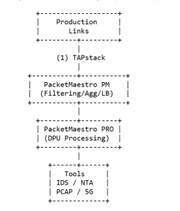
TAPstack → PacketMaestro → PacketMaestro PRO → Tools (IDS, NTA, PCAP, APM, 5G Analytics, etc.)
2. Architecture
Layer 1: TAPstack — Traffic Acquisition
TAPstack provides the physical access points for all links you want to monitor.
Where it fits:
-
Inline or OOB optical/multimode/singlemode up to 400G
-
High-density 1U blocks (up to 24 TAPs)
-
Copper TAPs for 1G/10G server and appliance links
Why it matters:
-
100% passive, fault-tolerant
-
Produces an exact copy of traffic without any risk to production
-
Available split ratios tune your optical budgets
This is your “clean data source.”
Layer 2: PacketMaestro — L2 Visibility Fabric
PacketMaestro takes all TAP outputs and organizes traffic delivery to the right tools.
Core functions:
-
Aggregation, replication, filtering, load balancing
-
L2–L4 filtering for IPv4/IPv6
-
VLAN tagging/untagging
-
Port breakout (e.g., 400G→4×100G, 100G→4×25G)
-
Multi-Tbps switching throughput
Why it matters:
-
Simplifies large TAP environments
-
Consolidates visibility across multiple racks
-
Reduces tool sprawl by sending only relevant traffic
Common hardware choices:
-
PM10 (10G)
-
PM25 (25G)
-
PM100 (100G)
-
PM400 (400G) — often used as a visibility spine
This is your “traffic distribution layer.”
Layer 3: PacketMaestro PRO — Advanced Processing
PacketMaestro PRO adds intelligent, DPU-powered processing when you need deeper analytics.
What it does:
-
Deduplication
-
Packet trimming / slicing
-
DPI
-
Data masking
-
Tunnel termination and filtering: GTP, VXLAN, GRE
-
Inner-IP load balancing
-
LTE/5G session correlation (IMSI, UE, TEID)
-
sFlow/NetFlow generation
Hardware options:
-
ADP100 / ADP120 (single DPU)
-
ADP200 / ADP220 (dual DPU, higher throughput)
These appliances plug into your visibility fabric like any other tool target.
They are ideal when your downstream tools cannot handle raw high-rate traffic.
They are ideal when your downstream tools cannot handle raw high-rate traffic.
This is your “intelligence and traffic conditioning layer.”
3. End-to-End Data Path
Step-by-step traffic path
-
Production link → TAPstack
TAPstack creates a lossless copy of both directions. -
TAPstack → PacketMaestro ingress
All TAP outputs feed into PM at 10G/25G/100G/400G depending on the network. -
PacketMaestro → Filtering/Aggregation
PM groups, filters, and distributes traffic by service type, VLAN, app, or tool function. -
PacketMaestro → PacketMaestro PRO (optional)
When deeper inspection or cleanup is needed (e.g., for mobile cores or forensic tools), PM forwards traffic to ADP nodes. -
PacketMaestro PRO → Tool Farms
PM PRO cleans, correlates, trims, masks, or decapsulates traffic and sends optimized traffic to: -
IDS / IPS
-
NDR / NTA (ExtraHop, Darktrace, etc.)
-
PCAP appliances (FMADIO, Endace)
-
Compliance / Forensics
-
UE analytics / 5G probes
4. Typical Deployment Scenarios
A. Data Center / Enterprise Core
-
TAPstack on top-of-rack or core uplinks
-
PacketMaestro PM400 as visibility spine
-
PacketMaestro PM25/PM100 as leafs
-
PM PRO for deduplication, masking, flow export
-
Tools: NDR, APM, Forensics, PCAP
Benefit: Reduce tool load by 50–70% through dedup + trimming.
B. Mobile Carrier (4G/5G EPC / 5GC)
-
TAPstack on S1-U, N3, N6, N9, and interconnect links
-
PM100/PM400 for aggregation
-
ADP200/220 for:
-
GTP decap/filtering
-
5G signaling correlation (IMSI/IMEI/TEID)
-
Data masking
-
DPI
-
Tools: probe farms, analytics, lawful intercept, user-plane monitoring
Benefit: Turns high-volume GTP tunnels into tool-friendly sessions.
C. Inline Security / Zero Trust Visibility
-
TAPstack inline copper with bypass options
-
PM25/PM100 distributing decrypted or segmented traffic
-
PM PRO for packet modification or DPI
-
Tools: IDS, IPS, DLP, Proxy, Decryption gateways
Benefit: Clean traffic hand-off with full fail-safe behavior.
5. Management and Automation
MaestroVision ties the whole stack together:
-
Auto-discovery of PM + PM PRO appliances
-
Centralized drag-and-drop map/rule creation
-
Topology-aware visibility view
-
Real-time stats and telemetry
-
Advanced search across devices
This makes large, multi-rack or multi-site visibility deployments easy to operate.
6. High-Level Reference Diagram (Text Version)
7. Deployment Tips
When to use PM PRO
-
Duplicates are >20% of traffic
-
Heavy tunneling: GTP, VXLAN, GRE
-
Tools cannot ingest raw 100G/400G
-
Need masking or privacy controls
-
Need session-steered traffic for probes
When PM alone is enough
-
Basic aggregation and filtering
-
Low-volume packet brokering
-
Simple multicast/replication
Where to place TAPstack
-
At any link where visibility matters: core, edge, DC spine, 5G UPF, SGW, routers, firewalls
